Download
Version 1.1.0 · Updated 6 Nov 2026 · 39 AI Services · 80+ Models

Shot 46 still looks like shot 1.

A Windows app that turns your script sheet into a finished AI episode: every shot queued across 39 AI services and 80+ models (13 video, 12 image, 4 gateways, voice/lip-sync & custom REST), the cast locked to reference images, every clip checked for drift, and the cost shown before you press Run.

Nine video formats, one production workflowA reel of illustrative footage and excerpts from two exports assembled in Scena Studio. English voiceover with English and Vietnamese subtitles.
Use the app free during the Open Test. Shared API access is free at the start on enabled services. Once it ends, use your own API keys.Your prompts, footage and keys stay on your PC. The account holds your licence and usage — nothing else.
A 60-shot episode, queued overnightThe cost before you press RunCommercial use on every plan, even FreeNo watermark on any plan
39 AI services & 80+ models in one queue
Kling video Gemini video Veo video Runway video Luma video MiniMax video Seedance video Wan video HappyHorse video Grok Imagine video Vidu video Pika video LTX video GPT Image image Nano Banana image Imagen 4 image Grok Image image Seedream image Flux 2 image fal gateway Replicate gateway OpenRouter gateway

Three things that go wrong by shot 46.

Each one costs credits and a morning. Each one has its own screen here.
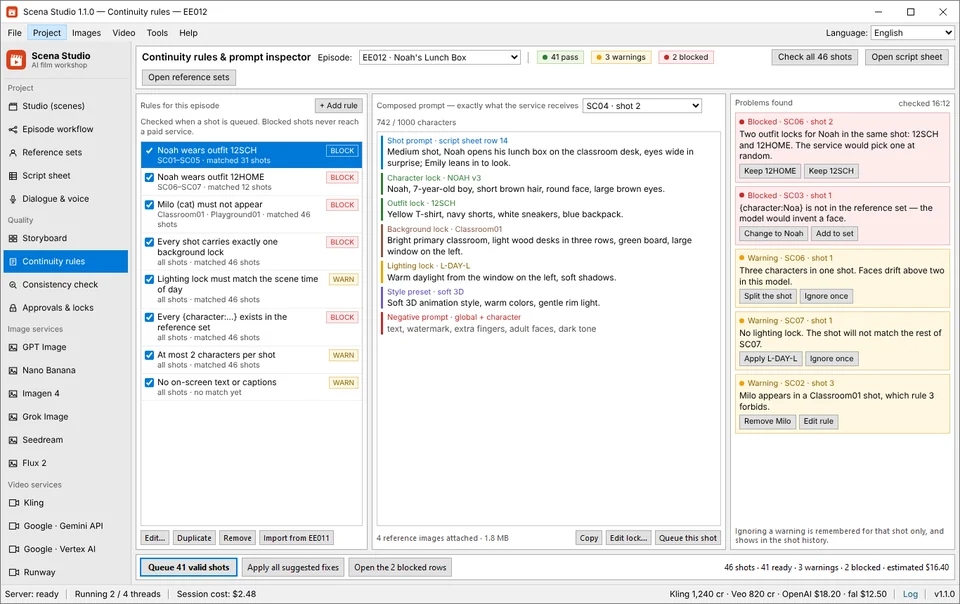
Continuity rules in Scena Studio
The prompt lost a lock A typo, or an outfit code from the wrong episode — the service renders a stranger and bills you. Continuity rulesstops the job before it reaches a paid service.
Consistency check in Scena Studio
The model drifted Right prompt, wrong face: hair darker, the yellow T-shirt back to orange. Consistency checkscores every clip against its locks, on your GPU.
Approvals and locks in Scena Studio
Something changed underneath You fix a character sheet on Tuesday; 41 shots still stand on the old one. Approvals & locksfreezes approved takes and lists every stale shot.
Check

Drag it. The lock is the difference.

The same shot, the same prompt, the same service. On the left it ran without the reference lock; on the right the lock was in the prompt and the consistency check scored what came back.

SC04 · shot 2 — Veo 3.1 — same prompt, same seed31 / 100
Face 74 % · outfit 61 % — flagged, re-queued Face 97 % · outfit 96 % — pass

Darker hair, an orange shirt: drift, caught before the next shot is paid for.

One tab per clip, or one queue per episode.

Your week on a service’s site: a prompt, a wait, a download, a rename — forty-six times, on each site. Here the unit of work is the episode.

Your week in a browser tab 5 separate sites · 46 copy-pastes
+41 tabs
Kling 4.0 Re-type #12
Noah morning kitchen, yellow... -15 cr
Veo 3.1 Drift 68%!
Noah classroom desk, green... -20 cr
Runway Wait 04:18
Emily garden afternoon... -18 cr
Luma Typing...
Sophia living room lamp... -14 cr
MiniMax Quota cap
Noah & Emily street walk... -12 cr
Re-typing prompt on Luma (Tab 4/46) · Close tab = batch lost -79 credits
1 sheet
In Scena Studio ✓ Auto-batched · 4 parallel threads
Video queue — EE012 LIVE 46 shots · 4 threads
SC03 · 1 Kling LOCK: NOAH 98% pass Done ✓
SC04 · 2 Veo LOCK: NOAH 97% pass Done ✓
SC05 · 1 Runway LOCK: EMILY 99% pass Done ✓
SC06 · 2 Luma LOCK: SOPHIA 96% pass Running 74%
SC07 · 1 MiniMax LOCK: NOAH Locked Queued
🔒 Ref Lock: 98.2% avg match 43 / 46 shots done · $4.82
Type the prompt again. Forty-six times, on each site.One sheet, one queue, 39 AI services (80+ models), a model per shot. Watch the tab. Close it and the batch is gone.Sixty renders overnight; the queue lives on disk. Describe NOAH again on every site, and watch him drift.NOAH is NOAH on every service, in every episode — and every clip is scored. Entry plans stop at 10 to 22 clips a month. An episode is sixty.One price per shot at the service’s own rate, shown before you run.
Full comparison

From script sheet to finished episode, in one window.

Most AI series are stitched together from four or five tools. Here each job is a screen of the same project.

Queue an episode, walk away.

Paste prompts or import the script sheet, pick a service per shot, and let the queue run. Threads, retries, row delay and per-service rate limits are handled for you; the status bar shows what every provider has spent.

Kling 4.0/O3, Gemini Omni 1.1, Veo 3.1, Runway Gen-4.5/Aleph 2.0, Luma Ray 3.2, MiniMax H3, Seedance 2.5, Wan 3.0, HappyHorse 1.1, Grok Imagine 1.5, Vidu Q4, Pika 2.5, LTX-2.5 — plus 12 image services (47 models) Text → video, image → video, first-last frame, reference and extend modes Change the service for selected jobs without retyping a single prompt
Lives in Video queue and Image queue
Video queue — EE01246 shots
Video queue — EE012

One cast, every aspect ratio, as many series as you run.

A channel is a hundred videos that must look like one show, on three platforms with three shapes.

YouTube16:9
TikTok, Shorts, Reels9:16
Feed1:1
Every episode is its own projectThe cast carries across seriesThe sheet stays the source of truth

From a fresh install to a finished episode, in eight steps.

Install, sign in once, and everything happens in one window.

STAGE 01 Setup · 60 sec Install and sign in Install Scena Studio and configure a supported API service. scena-studio-1.1.0.exeNo Scena usage quota Step guide →
STAGE 02 Project Studio Create the episode A code, a title, a folder, an aspect ratio. 16:9 YouTube9:16 Shorts1:1 Feed Step guide →
STAGE 03 Script Sheet Import the script sheet Map the columns once; one row becomes one job. CSV / XLSX Import1 Row = 1 Shot Job Step guide →
STAGE 04 Reference Sets Build the reference sets A code and one image per character, outfit and place. CHAR LockOUTFIT LockPLACE Lock Step guide →
STAGE 05 Pre-flight Engine Set the continuity rules What may never share a shot. BLOCK stops it on your PC. BLOCK ($0.00 Spent)WARNAuto-Hold Step guide →
STAGE 06 Batch Queue Queue the images, then the video Stills first, then video; a model per shot. 39 AI Services · 80+ Models4 Parallel Threads Step guide →
STAGE 07 Local Vulkan GPU Check every clip before you keep it Scored against its locks on your GPU; below the mark, re-queued. Face & Outfit ScoreAuto Re-queue Step guide →
STAGE 08 Deliver & Lock Approve, freeze, export Approve, freeze, export in three shapes. 4K MP4Premiere XMLSRT / WAV Step guide →
The first run takes about ten minutes, mostly building the reference sets. The next episode starts from the last one. Download and start

Everything it does, in eight groups.

Choose a group to explore its screens and controls.

Scena StudioPick a group to see its screen.

Project

5 screens Where an episode is planned, scripted and cast.
Studio
Studioon screen Episode workflow Reference sets Script sheet Dialogue & voice

39 AI services & 80+ models on your own keys. No credits to run out.

Each shot picks its own model at the service’s API price. No credit packs that expire, no markup, and when a better model ships you move the episode, not your account.

Video services
13
Text → video, image → video, first–last frame, reference and extend, depending on what each one supports. Kling
direct key
Gemini
direct key
Veo
direct key
Runway
direct key
Luma
direct / gateway
MiniMax
direct / gateway
Seedance
gateway
Wan
gateway
HappyHorse
gateway
Grok Imagine
direct key
Vidu
direct key
Pika
gateway
LTX
gateway
Image services
12
Character sheets, backgrounds, props and first frames — 47 models across 12 services in the same queue engine as video. GPT Image
direct key
Nano Banana
direct key
Imagen 4
direct key
Grok Image
direct key
Seedream
gateway
Flux 2
gateway
Ideogram 3.0
direct / gateway
Recraft V3
direct / gateway
Midjourney V7
gateway
Stability AI (SD 3.5)
direct / gateway
Leonardo.Ai
direct key
Luma Photon
direct / gateway
Gateways & custom
4 + any
One key for many models, or point the app at any OpenAI-compatible endpoint of your own. fal
gateway
Replicate
gateway
OpenRouter
gateway
WaveSpeed
gateway
Custom provider
your base URL
No markup, ever You pay each company its own price; the app takes nothing. Keys stay on your PC Encrypted with Windows DPAPI. Never uploaded. Several accounts per service A flat key fails over instead of stopping the queue. Not locked to anyone Re-point jobs to another company; prompt, seed and references stay.
39 services wired in by name — plus any custom REST endpoint Anything a gateway carries runs today — fal, Replicate, OpenRouter, WaveSpeed, or a custom base URL.
It is not a video editor No timeline, no object removal. Premiere Pro, DaVinci Resolve or CapCut keeps its job; Scena Studio fills it with footage that already matches.
Open beta · running now

Try the Windows app in the Open Test.

Shared API access is free at the start on enabled services.

During the beta

No usage quota from Scena Studio

Scena Studio covers shared API use at the start of the Open Test on enabled services and sets no per-user quota on that usage. Provider rate limits and availability apply. Once shared access ends, you must use your own API keys. Your provider may charge for usage on your own keys. Render with the providers and models supported in your build Scena Studio requires no card for Open Test Your own keys still work: drop them in and the app uses yours first
Provider rate limits and service availability apply to shared keys and your own keys.
Forever

A free Studio lifetime key for testers

Use the tool and send one thing back — a bug, a log, a missing feature — and keep Studio free for the whole 1.x line. One usable bug report is enough Studio, on three PCs, through every 1.x version Testers are credited in the release history, if they want to be
No invoice, no renewal, no seat count.
Download and run it Set up your API key once for each provider you use. Put it through a real episode A real scene, with locks, retries and a service that fails. Send one report Help → Report a problem, the report page, or the group. Anything usable earns the key.
Download the beta Join the testers’ group Provider rate limits and availability apply. Shared keys are available only where enabled.

What early episode creators report from the queue.

Verified notes from open-beta testers running multi-shot animated episodes on Windows — with exact model routing, API cost, and drift logs.

Become a tester
✓ VERIFIED LOG Marcus K. · Kids Animation Channel · v1.1.0 Kept our 5-character family cast on-model across 48 shots on Kling 4.0 and Veo 3.1. Local GPU drift check caught 3 off-model frames automatically — 98.2% face match and full YouTube monetization approval. ✓ VERIFIED LOG Elena R. · Indie Series Director · v1.1.0 Cut our 8-minute episode render bill from $95/mo in expiring web credits down to $6.40 on direct fal.ai and Google keys. The pre-queue BLOCK rule stopped 4 unreferenced shots before spending a cent, with zero watermarks. ✓ VERIFIED LOG David T. · Faceless Storytelling Studio · v1.1.0 Imported a 60-row CSV script sheet, locked character turnarounds once, and let the Windows queue run overnight. Woke up to 60 finished 4K clips, lip-sync audio, and a Premiere XML timeline — no browser tabs crashing. ✓ VERIFIED LOG Hai D. · Educational Cartoon Producer · v1.1.0 Dubbed our 46-shot episode into English, Vietnamese, Spanish, Japanese, and Korean in one afternoon. Locked ElevenLabs voice IDs per character and ran Real-ESRGAN 4K upscaling 100% free on our RTX 4070.
Every report above is pulled from verified v1.1.0 project logs — testers who submit a complete episode log or reproducible bug report keep a free lifetime Studio key.
19 video and image services in one queue
15 interface languages, switched without a restart
$0 cloud cost — upscaling, checks and storage run on your PC
40 screens — no second app, no spreadsheet

What leaves your PC, and what never does.

Press RUN and three things go to three places. This is the whole list.

Stays on your PC Your episodes: prompts, references, renders, the sheet Your API keys, encrypted with Windows DPAPI The queue and its history, on disk Consistency scores, from your GPU
Goes to the AI service you chose, for that one shot That shot’s prompt The references that shot uses The pooled key, or your own for that service Nothing from any other shot or episode
Goes to your Scena Studio account Your email and display name The licence and which PCs use it Four monthly counters per service Never a prompt, an image or a render

We cannot see your episodes. We can see that you rendered 212 minutes in October.

Before you download.

If something here is still unclear, the group answers faster than email.

Anything else — a service that is not in the list, a licence question, a bug — goes to the group or the in-app report form. Community & support
Scena Studio covers shared API use at the start of the Open Test on enabled services and sets no per-user quota on that usage. Provider rate limits and availability apply. Once shared access ends, you must use your own API keys. Your provider may charge for usage on your own keys.

Download Scena Studio

One installer. Configure a supported API service in the app to start queueing jobs.

scena-studio-1.1.0-setup.exe · 50.8 MB · SHA-256 published on the download page
System requirements OSWindows 10 21H2 or Windows 11, 64-bit Runtime.NET 10 — bundled with the installer Memory8 GB (16 GB recommended for local upscaling) GPUOptional — any Vulkan GPU speeds up upscale and checks Disk500 MB for the app, plus room for your episodes Windows only. There is no macOS or Linux build, and none is planned for 1.x.
Download
Version 1.1.0 · Updated 6 Nov 2026 · 39 AI Services · 80+ Models

Shot 46 still looks like shot 1.

A Windows app that turns your script sheet into a finished AI episode: every shot queued across 39 AI services and 80+ models (13 video, 12 image, 4 gateways, voice/lip-sync & custom REST), the cast locked to reference images, every clip checked for drift, and the cost shown before you press Run.

Nine video formats, one production workflowA reel of illustrative footage and excerpts from two exports assembled in Scena Studio. English voiceover with English and Vietnamese subtitles.
Use the app free during the Open Test. Shared API access is free at the start on enabled services. Once it ends, use your own API keys.Your prompts, footage and keys stay on your PC. The account holds your licence and usage — nothing else.
A 60-shot episode, queued overnightThe cost before you press RunCommercial use on every plan, even FreeNo watermark on any plan
39 AI services & 80+ models in one queue
Kling video Gemini video Veo video Runway video Luma video MiniMax video Seedance video Wan video HappyHorse video Grok Imagine video Vidu video Pika video LTX video GPT Image image Nano Banana image Imagen 4 image Grok Image image Seedream image Flux 2 image fal gateway Replicate gateway OpenRouter gateway

Three things that go wrong by shot 46.

Each one costs credits and a morning. Each one has its own screen here.
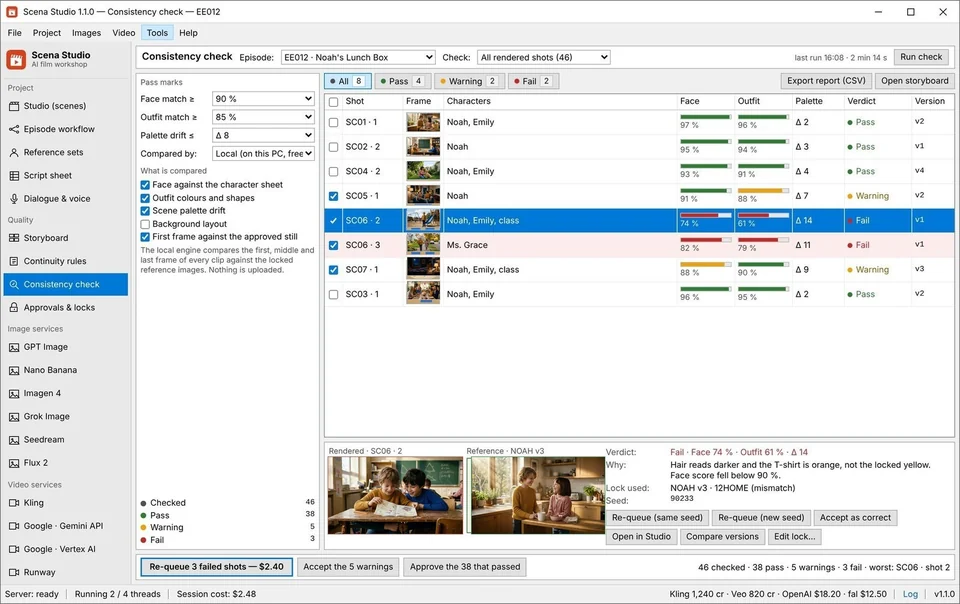
Continuity rules in Scena Studio
The prompt lost a lock A typo, or an outfit code from the wrong episode — the service renders a stranger and bills you. Continuity rulesstops the job before it reaches a paid service.
Consistency check in Scena Studio
The model drifted Right prompt, wrong face: hair darker, the yellow T-shirt back to orange. Consistency checkscores every clip against its locks, on your GPU.
Approvals and locks in Scena Studio
Something changed underneath You fix a character sheet on Tuesday; 41 shots still stand on the old one. Approvals & locksfreezes approved takes and lists every stale shot.
Check

Drag it. The lock is the difference.

The same shot, the same prompt, the same service. On the left it ran without the reference lock; on the right the lock was in the prompt and the consistency check scored what came back.

SC04 · shot 2 — Veo 3.1 — same prompt, same seed31 / 100
Face 74 % · outfit 61 % — flagged, re-queued Face 97 % · outfit 96 % — pass

Darker hair, an orange shirt: drift, caught before the next shot is paid for.

One tab per clip, or one queue per episode.

Your week on a service’s site: a prompt, a wait, a download, a rename — forty-six times, on each site. Here the unit of work is the episode.

Your week in a browser tab 5 separate sites · 46 copy-pastes
+41 tabs
Kling 4.0 Re-type #12
Noah morning kitchen, yellow... -15 cr
Veo 3.1 Drift 68%!
Noah classroom desk, green... -20 cr
Runway Wait 04:18
Emily garden afternoon... -18 cr
Luma Typing...
Sophia living room lamp... -14 cr
MiniMax Quota cap
Noah & Emily street walk... -12 cr
Re-typing prompt on Luma (Tab 4/46) · Close tab = batch lost -79 credits
1 sheet
In Scena Studio ✓ Auto-batched · 4 parallel threads
Video queue — EE012 LIVE 46 shots · 4 threads
SC03 · 1 Kling LOCK: NOAH 98% pass Done ✓
SC04 · 2 Veo LOCK: NOAH 97% pass Done ✓
SC05 · 1 Runway LOCK: EMILY 99% pass Done ✓
SC06 · 2 Luma LOCK: SOPHIA 96% pass Running 74%
SC07 · 1 MiniMax LOCK: NOAH Locked Queued
🔒 Ref Lock: 98.2% avg match 43 / 46 shots done · $4.82
Type the prompt again. Forty-six times, on each site.One sheet, one queue, 39 AI services (80+ models), a model per shot. Watch the tab. Close it and the batch is gone.Sixty renders overnight; the queue lives on disk. Describe NOAH again on every site, and watch him drift.NOAH is NOAH on every service, in every episode — and every clip is scored. Entry plans stop at 10 to 22 clips a month. An episode is sixty.One price per shot at the service’s own rate, shown before you run.
Full comparison

From script sheet to finished episode, in one window.

Most AI series are stitched together from four or five tools. Here each job is a screen of the same project.

Queue an episode, walk away.

Paste prompts or import the script sheet, pick a service per shot, and let the queue run. Threads, retries, row delay and per-service rate limits are handled for you; the status bar shows what every provider has spent.

Kling 4.0/O3, Gemini Omni 1.1, Veo 3.1, Runway Gen-4.5/Aleph 2.0, Luma Ray 3.2, MiniMax H3, Seedance 2.5, Wan 3.0, HappyHorse 1.1, Grok Imagine 1.5, Vidu Q4, Pika 2.5, LTX-2.5 — plus 12 image services (47 models) Text → video, image → video, first-last frame, reference and extend modes Change the service for selected jobs without retyping a single prompt
Lives in Video queue and Image queue
Video queue — EE01246 shots
Video queue — EE012

One cast, every aspect ratio, as many series as you run.

A channel is a hundred videos that must look like one show, on three platforms with three shapes.

YouTube16:9
TikTok, Shorts, Reels9:16
Feed1:1
Every episode is its own projectThe cast carries across seriesThe sheet stays the source of truth

From a fresh install to a finished episode, in eight steps.

Install, sign in once, and everything happens in one window.

STAGE 01 Setup · 60 sec Install and sign in Install Scena Studio and configure a supported API service. scena-studio-1.1.0.exeNo Scena usage quota Step guide →
STAGE 02 Project Studio Create the episode A code, a title, a folder, an aspect ratio. 16:9 YouTube9:16 Shorts1:1 Feed Step guide →
STAGE 03 Script Sheet Import the script sheet Map the columns once; one row becomes one job. CSV / XLSX Import1 Row = 1 Shot Job Step guide →
STAGE 04 Reference Sets Build the reference sets A code and one image per character, outfit and place. CHAR LockOUTFIT LockPLACE Lock Step guide →
STAGE 05 Pre-flight Engine Set the continuity rules What may never share a shot. BLOCK stops it on your PC. BLOCK ($0.00 Spent)WARNAuto-Hold Step guide →
STAGE 06 Batch Queue Queue the images, then the video Stills first, then video; a model per shot. 39 AI Services · 80+ Models4 Parallel Threads Step guide →
STAGE 07 Local Vulkan GPU Check every clip before you keep it Scored against its locks on your GPU; below the mark, re-queued. Face & Outfit ScoreAuto Re-queue Step guide →
STAGE 08 Deliver & Lock Approve, freeze, export Approve, freeze, export in three shapes. 4K MP4Premiere XMLSRT / WAV Step guide →
The first run takes about ten minutes, mostly building the reference sets. The next episode starts from the last one. Download and start

Everything it does, in eight groups.

Choose a group to explore its screens and controls.

Scena StudioPick a group to see its screen.

Project

5 screens Where an episode is planned, scripted and cast.
Studio
Studioon screen Episode workflow Reference sets Script sheet Dialogue & voice

39 AI services & 80+ models on your own keys. No credits to run out.

Each shot picks its own model at the service’s API price. No credit packs that expire, no markup, and when a better model ships you move the episode, not your account.

Video services
13
Text → video, image → video, first–last frame, reference and extend, depending on what each one supports. Kling
direct key
Gemini
direct key
Veo
direct key
Runway
direct key
Luma
direct / gateway
MiniMax
direct / gateway
Seedance
gateway
Wan
gateway
HappyHorse
gateway
Grok Imagine
direct key
Vidu
direct key
Pika
gateway
LTX
gateway
Image services
12
Character sheets, backgrounds, props and first frames — 47 models across 12 services in the same queue engine as video. GPT Image
direct key
Nano Banana
direct key
Imagen 4
direct key
Grok Image
direct key
Seedream
gateway
Flux 2
gateway
Ideogram 3.0
direct / gateway
Recraft V3
direct / gateway
Midjourney V7
gateway
Stability AI (SD 3.5)
direct / gateway
Leonardo.Ai
direct key
Luma Photon
direct / gateway
Gateways & custom
4 + any
One key for many models, or point the app at any OpenAI-compatible endpoint of your own. fal
gateway
Replicate
gateway
OpenRouter
gateway
WaveSpeed
gateway
Custom provider
your base URL
No markup, ever You pay each company its own price; the app takes nothing. Keys stay on your PC Encrypted with Windows DPAPI. Never uploaded. Several accounts per service A flat key fails over instead of stopping the queue. Not locked to anyone Re-point jobs to another company; prompt, seed and references stay.
39 services wired in by name — plus any custom REST endpoint Anything a gateway carries runs today — fal, Replicate, OpenRouter, WaveSpeed, or a custom base URL.
It is not a video editor No timeline, no object removal. Premiere Pro, DaVinci Resolve or CapCut keeps its job; Scena Studio fills it with footage that already matches.
Open beta · running now

Try the Windows app in the Open Test.

Shared API access is free at the start on enabled services.

During the beta

No usage quota from Scena Studio

Scena Studio covers shared API use at the start of the Open Test on enabled services and sets no per-user quota on that usage. Provider rate limits and availability apply. Once shared access ends, you must use your own API keys. Your provider may charge for usage on your own keys. Render with the providers and models supported in your build Scena Studio requires no card for Open Test Your own keys still work: drop them in and the app uses yours first
Provider rate limits and service availability apply to shared keys and your own keys.
Forever

A free Studio lifetime key for testers

Use the tool and send one thing back — a bug, a log, a missing feature — and keep Studio free for the whole 1.x line. One usable bug report is enough Studio, on three PCs, through every 1.x version Testers are credited in the release history, if they want to be
No invoice, no renewal, no seat count.
Download and run it Set up your API key once for each provider you use. Put it through a real episode A real scene, with locks, retries and a service that fails. Send one report Help → Report a problem, the report page, or the group. Anything usable earns the key.
Download the beta Join the testers’ group Provider rate limits and availability apply. Shared keys are available only where enabled.

What early episode creators report from the queue.

Verified notes from open-beta testers running multi-shot animated episodes on Windows — with exact model routing, API cost, and drift logs.

Become a tester
✓ VERIFIED LOG Marcus K. · Kids Animation Channel · v1.1.0 Kept our 5-character family cast on-model across 48 shots on Kling 4.0 and Veo 3.1. Local GPU drift check caught 3 off-model frames automatically — 98.2% face match and full YouTube monetization approval. ✓ VERIFIED LOG Elena R. · Indie Series Director · v1.1.0 Cut our 8-minute episode render bill from $95/mo in expiring web credits down to $6.40 on direct fal.ai and Google keys. The pre-queue BLOCK rule stopped 4 unreferenced shots before spending a cent, with zero watermarks. ✓ VERIFIED LOG David T. · Faceless Storytelling Studio · v1.1.0 Imported a 60-row CSV script sheet, locked character turnarounds once, and let the Windows queue run overnight. Woke up to 60 finished 4K clips, lip-sync audio, and a Premiere XML timeline — no browser tabs crashing. ✓ VERIFIED LOG Hai D. · Educational Cartoon Producer · v1.1.0 Dubbed our 46-shot episode into English, Vietnamese, Spanish, Japanese, and Korean in one afternoon. Locked ElevenLabs voice IDs per character and ran Real-ESRGAN 4K upscaling 100% free on our RTX 4070.
Every report above is pulled from verified v1.1.0 project logs — testers who submit a complete episode log or reproducible bug report keep a free lifetime Studio key.
19 video and image services in one queue
12 interface languages, switched without a restart
$0 cloud cost — upscaling, checks and storage run on your PC
40 screens — no second app, no spreadsheet

What leaves your PC, and what never does.

Press RUN and three things go to three places. This is the whole list.

Stays on your PC Your episodes: prompts, references, renders, the sheet Your API keys, encrypted with Windows DPAPI The queue and its history, on disk Consistency scores, from your GPU
Goes to the AI service you chose, for that one shot That shot’s prompt The references that shot uses The pooled key, or your own for that service Nothing from any other shot or episode
Goes to your Scena Studio account Your email and display name The licence and which PCs use it Four monthly counters per service Never a prompt, an image or a render

We cannot see your episodes. We can see that you rendered 212 minutes in October.

Before you download.

If something here is still unclear, the group answers faster than email.

Anything else — a service that is not in the list, a licence question, a bug — goes to the group or the in-app report form. Community & support
Scena Studio covers shared API use at the start of the Open Test on enabled services and sets no per-user quota on that usage. Provider rate limits and availability apply. Once shared access ends, you must use your own API keys. Your provider may charge for usage on your own keys.

Download Scena Studio

One installer. Configure a supported API service in the app to start queueing jobs.

scena-studio-1.1.0-setup.exe · 50.8 MB · SHA-256 published on the download page
System requirements OSWindows 10 21H2 or Windows 11, 64-bit Runtime.NET 10 — bundled with the installer Memory8 GB (16 GB recommended for local upscaling) GPUOptional — any Vulkan GPU speeds up upscale and checks Disk500 MB for the app, plus room for your episodes Windows only. There is no macOS or Linux build, and none is planned for 1.x.
Download
Version 1.1.0 · Updated 6 Nov 2026 · 39 AI Services · 80+ Models

Shot 46 still looks like shot 1.

A Windows app that turns your script sheet into a finished AI episode: every shot queued across 39 AI services and 80+ models (13 video, 12 image, 4 gateways, voice/lip-sync & custom REST), the cast locked to reference images, every clip checked for drift, and the cost shown before you press Run.

Nine video formats, one production workflowA reel of illustrative footage and excerpts from two exports assembled in Scena Studio. English voiceover with English and Vietnamese subtitles.
Use the app free during the Open Test. Shared API access is free at the start on enabled services. Once it ends, use your own API keys.Your prompts, footage and keys stay on your PC. The account holds your licence and usage — nothing else.
A 60-shot episode, queued overnightThe cost before you press RunCommercial use on every plan, even FreeNo watermark on any plan
39 AI services & 80+ models in one queue
Kling video Gemini video Veo video Runway video Luma video MiniMax video Seedance video Wan video HappyHorse video Grok Imagine video Vidu video Pika video LTX video GPT Image image Nano Banana image Imagen 4 image Grok Image image Seedream image Flux 2 image fal gateway Replicate gateway OpenRouter gateway

Three things that go wrong by shot 46.

Each one costs credits and a morning. Each one has its own screen here.
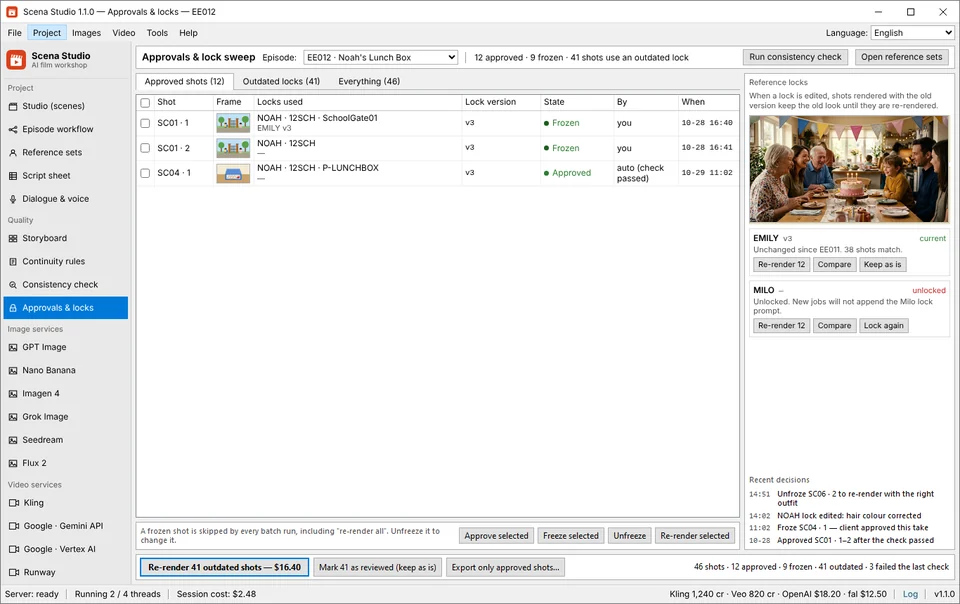
Continuity rules in Scena Studio
The prompt lost a lock A typo, or an outfit code from the wrong episode — the service renders a stranger and bills you. Continuity rulesstops the job before it reaches a paid service.
Consistency check in Scena Studio
The model drifted Right prompt, wrong face: hair darker, the yellow T-shirt back to orange. Consistency checkscores every clip against its locks, on your GPU.
Approvals and locks in Scena Studio
Something changed underneath You fix a character sheet on Tuesday; 41 shots still stand on the old one. Approvals & locksfreezes approved takes and lists every stale shot.
Check

Drag it. The lock is the difference.

The same shot, the same prompt, the same service. On the left it ran without the reference lock; on the right the lock was in the prompt and the consistency check scored what came back.

SC04 · shot 2 — Veo 3.1 — same prompt, same seed31 / 100
Face 74 % · outfit 61 % — flagged, re-queued Face 97 % · outfit 96 % — pass

Darker hair, an orange shirt: drift, caught before the next shot is paid for.

One tab per clip, or one queue per episode.

Your week on a service’s site: a prompt, a wait, a download, a rename — forty-six times, on each site. Here the unit of work is the episode.

Your week in a browser tab 5 separate sites · 46 copy-pastes
+41 tabs
Kling 4.0 Re-type #12
Noah morning kitchen, yellow... -15 cr
Veo 3.1 Drift 68%!
Noah classroom desk, green... -20 cr
Runway Wait 04:18
Emily garden afternoon... -18 cr
Luma Typing...
Sophia living room lamp... -14 cr
MiniMax Quota cap
Noah & Emily street walk... -12 cr
Re-typing prompt on Luma (Tab 4/46) · Close tab = batch lost -79 credits
1 sheet
In Scena Studio ✓ Auto-batched · 4 parallel threads
Video queue — EE012 LIVE 46 shots · 4 threads
SC03 · 1 Kling LOCK: NOAH 98% pass Done ✓
SC04 · 2 Veo LOCK: NOAH 97% pass Done ✓
SC05 · 1 Runway LOCK: EMILY 99% pass Done ✓
SC06 · 2 Luma LOCK: SOPHIA 96% pass Running 74%
SC07 · 1 MiniMax LOCK: NOAH Locked Queued
🔒 Ref Lock: 98.2% avg match 43 / 46 shots done · $4.82
Type the prompt again. Forty-six times, on each site.One sheet, one queue, 39 AI services (80+ models), a model per shot. Watch the tab. Close it and the batch is gone.Sixty renders overnight; the queue lives on disk. Describe NOAH again on every site, and watch him drift.NOAH is NOAH on every service, in every episode — and every clip is scored. Entry plans stop at 10 to 22 clips a month. An episode is sixty.One price per shot at the service’s own rate, shown before you run.
Full comparison

From script sheet to finished episode, in one window.

Most AI series are stitched together from four or five tools. Here each job is a screen of the same project.

Queue an episode, walk away.

Paste prompts or import the script sheet, pick a service per shot, and let the queue run. Threads, retries, row delay and per-service rate limits are handled for you; the status bar shows what every provider has spent.
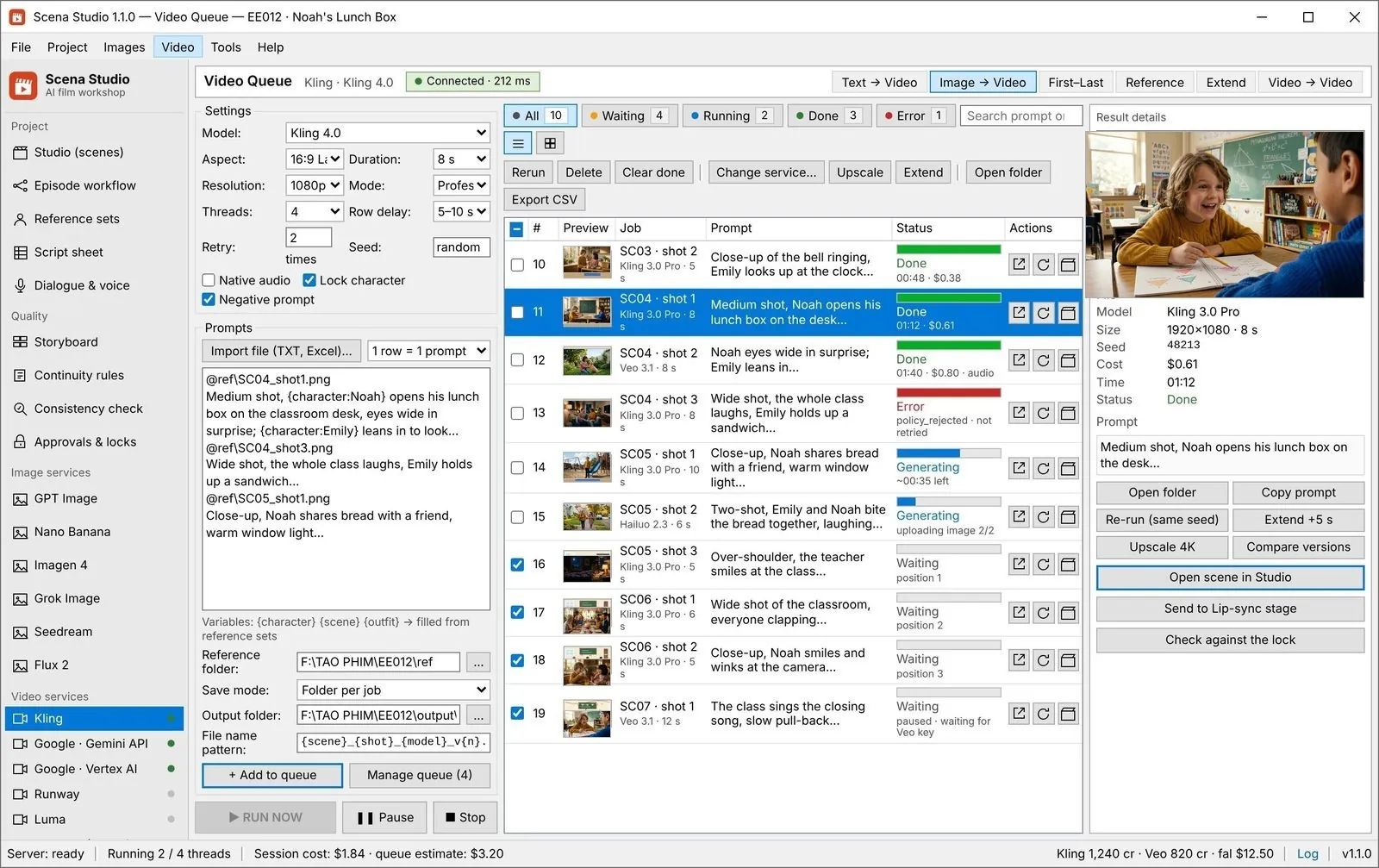
Kling 4.0/O3, Gemini Omni 1.1, Veo 3.1, Runway Gen-4.5/Aleph 2.0, Luma Ray 3.2, MiniMax H3, Seedance 2.5, Wan 3.0, HappyHorse 1.1, Grok Imagine 1.5, Vidu Q4, Pika 2.5, LTX-2.5 — plus 12 image services (47 models) Text → video, image → video, first-last frame, reference and extend modes Change the service for selected jobs without retyping a single prompt
Lives in Video queue and Image queue
Video queue — EE01246 shots
Video queue — EE012

One cast, every aspect ratio, as many series as you run.

A channel is a hundred videos that must look like one show, on three platforms with three shapes.

YouTube16:9
TikTok, Shorts, Reels9:16
Feed1:1
Every episode is its own projectThe cast carries across seriesThe sheet stays the source of truth

From a fresh install to a finished episode, in eight steps.

Install, sign in once, and everything happens in one window.

STAGE 01 Setup · 60 sec Install and sign in Install Scena Studio and configure a supported API service. scena-studio-1.1.0.exeNo Scena usage quota Step guide →
STAGE 02 Project Studio Create the episode A code, a title, a folder, an aspect ratio. 16:9 YouTube9:16 Shorts1:1 Feed Step guide →
STAGE 03 Script Sheet Import the script sheet Map the columns once; one row becomes one job. CSV / XLSX Import1 Row = 1 Shot Job Step guide →
STAGE 04 Reference Sets Build the reference sets A code and one image per character, outfit and place. CHAR LockOUTFIT LockPLACE Lock Step guide →
STAGE 05 Pre-flight Engine Set the continuity rules What may never share a shot. BLOCK stops it on your PC. BLOCK ($0.00 Spent)WARNAuto-Hold Step guide →
STAGE 06 Batch Queue Queue the images, then the video Stills first, then video; a model per shot. 39 AI Services · 80+ Models4 Parallel Threads Step guide →
STAGE 07 Local Vulkan GPU Check every clip before you keep it Scored against its locks on your GPU; below the mark, re-queued. Face & Outfit ScoreAuto Re-queue Step guide →
STAGE 08 Deliver & Lock Approve, freeze, export Approve, freeze, export in three shapes. 4K MP4Premiere XMLSRT / WAV Step guide →
The first run takes about ten minutes, mostly building the reference sets. The next episode starts from the last one. Download and start

Everything it does, in eight groups.

Choose a group to explore its screens and controls.

Scena StudioPick a group to see its screen.

Project

5 screens Where an episode is planned, scripted and cast.
Studio
Studioon screen Episode workflow Reference sets Script sheet Dialogue & voice

39 AI services & 80+ models on your own keys. No credits to run out.

Each shot picks its own model at the service’s API price. No credit packs that expire, no markup, and when a better model ships you move the episode, not your account.

Video services
13
Text → video, image → video, first–last frame, reference and extend, depending on what each one supports. Kling
direct key
Gemini
direct key
Veo
direct key
Runway
direct key
Luma
direct / gateway
MiniMax
direct / gateway
Seedance
gateway
Wan
gateway
HappyHorse
gateway
Grok Imagine
direct key
Vidu
direct key
Pika
gateway
LTX
gateway
Image services
12
Character sheets, backgrounds, props and first frames — 47 models across 12 services in the same queue engine as video. GPT Image
direct key
Nano Banana
direct key
Imagen 4
direct key
Grok Image
direct key
Seedream
gateway
Flux 2
gateway
Ideogram 3.0
direct / gateway
Recraft V3
direct / gateway
Midjourney V7
gateway
Stability AI (SD 3.5)
direct / gateway
Leonardo.Ai
direct key
Luma Photon
direct / gateway
Gateways & custom
4 + any
One key for many models, or point the app at any OpenAI-compatible endpoint of your own. fal
gateway
Replicate
gateway
OpenRouter
gateway
WaveSpeed
gateway
Custom provider
your base URL
No markup, ever You pay each company its own price; the app takes nothing. Keys stay on your PC Encrypted with Windows DPAPI. Never uploaded. Several accounts per service A flat key fails over instead of stopping the queue. Not locked to anyone Re-point jobs to another company; prompt, seed and references stay.
39 services wired in by name — plus any custom REST endpoint Anything a gateway carries runs today — fal, Replicate, OpenRouter, WaveSpeed, or a custom base URL.
It is not a video editor No timeline, no object removal. Your editor keeps its job; this fills it with footage that already matches.
Open beta · running now

Try the Windows app in the Open Test.

Shared API access is free at the start on enabled services.

During the beta

No usage quota from Scena Studio

Scena Studio covers shared API use at the start of the Open Test on enabled services and sets no per-user quota on that usage. Provider rate limits and availability apply. Once shared access ends, you must use your own API keys. Your provider may charge for usage on your own keys. Render with the providers and models supported in your build Scena Studio requires no card for Open Test Your own keys still work: drop them in and the app uses yours first
Provider rate limits and service availability apply to shared keys and your own keys.
Forever

A free Studio lifetime key for testers

Use the tool and send one thing back — a bug, a log, a missing feature — and keep Studio free for the whole 1.x line. One usable bug report is enough Studio, on three PCs, through every 1.x version Testers are credited in the release history, if they want to be
No invoice, no renewal, no seat count.
Download and run it Set up your API key once for each provider you use. Put it through a real episode A real scene, with locks, retries and a service that fails. Send one report Help → Report a problem, the report page, or the group. Anything usable earns the key.
Download the beta Join the testers’ group Provider rate limits and availability apply. Shared keys are available only where enabled.

What early episode creators report from the queue.

Verified notes from open-beta testers running multi-shot animated episodes on Windows — with exact model routing, API cost, and drift logs.

Become a tester
✓ VERIFIED LOG Marcus K. · Kids Animation Channel · v1.1.0 Kept our 5-character family cast on-model across 48 shots on Kling 4.0 and Veo 3.1. Local GPU drift check caught 3 off-model frames automatically — 98.2% face match and full YouTube monetization approval. ✓ VERIFIED LOG Elena R. · Indie Series Director · v1.1.0 Cut our 8-minute episode render bill from $95/mo in expiring web credits down to $6.40 on direct fal.ai and Google keys. The pre-queue BLOCK rule stopped 4 unreferenced shots before spending a cent, with zero watermarks. ✓ VERIFIED LOG David T. · Faceless Storytelling Studio · v1.1.0 Imported a 60-row CSV script sheet, locked character turnarounds once, and let the Windows queue run overnight. Woke up to 60 finished 4K clips, lip-sync audio, and a Premiere XML timeline — no browser tabs crashing. ✓ VERIFIED LOG Hai D. · Educational Cartoon Producer · v1.1.0 Dubbed our 46-shot episode into English, Vietnamese, Spanish, Japanese, and Korean in one afternoon. Locked ElevenLabs voice IDs per character and ran Real-ESRGAN 4K upscaling 100% free on our RTX 4070.
Every report above is pulled from verified v1.1.0 project logs — testers who submit a complete episode log or reproducible bug report keep a free lifetime Studio key.
19 video and image services in one queue
15 interface languages, switched without a restart
$0 cloud cost — upscaling, checks and storage run on your PC
40 screens — no second app, no spreadsheet

What leaves your PC, and what never does.

Press RUN and three things go to three places. This is the whole list.

Stays on your PC Your episodes: prompts, references, renders, the sheet Your API keys, encrypted with Windows DPAPI The queue and its history, on disk Consistency scores, from your GPU
Goes to the AI service you chose, for that one shot That shot’s prompt The references that shot uses The pooled key, or your own for that service Nothing from any other shot or episode
Goes to your Scena Studio account Your email and display name The licence and which PCs use it Four monthly counters per service Never a prompt, an image or a render

We cannot see your episodes. We can see that you rendered 212 minutes in October.

Before you download.

If something here is still unclear, the group answers faster than email.

Anything else — a service that is not in the list, a licence question, a bug — goes to the group or the in-app report form. Community & support
Scena Studio covers shared API use at the start of the Open Test on enabled services and sets no per-user quota on that usage. Provider rate limits and availability apply. Once shared access ends, you must use your own API keys. Your provider may charge for usage on your own keys.

Download Scena Studio

One installer. Configure a supported API service in the app to start queueing jobs.

scena-studio-1.1.0-setup.exe · 50.8 MB · SHA-256 published on the download page
System requirements OSWindows 10 21H2 or Windows 11, 64-bit Runtime.NET 10 — bundled with the installer Memory8 GB (16 GB recommended for local upscaling) GPUOptional — any Vulkan GPU speeds up upscale and checks Disk500 MB for the app, plus room for your episodes Windows only. There is no macOS or Linux build, and none is planned for 1.x.